How To Claim Your Business On Filoxeno
Business Claim Procedure allows the manager of a business that is already presented in Filoxeno.com to undertake it’s account and easily modify and manage thereafter the presentation, texts, photos, map position, contact info, special features etc.
The procedure is quite simple and following the next steps it only takes a few seconds
Step 1
In order to claim your business you need to Register first. If you don't be a user, you can register register now.
Step 2
Filoxeno will present you the business that might belong to you (based on your login email)
If you select a proposed business you will be directed to the business presentation where you may press the “Do you Own it?” button to continue the procedure. If your business is not suggested to you, you may find it using the search form in the main page of Filoxeno.com
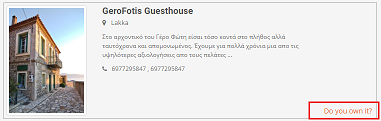
Step 3
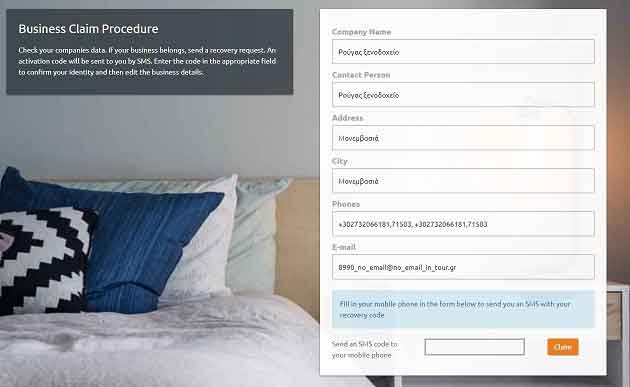
By selecting the Do you own it?, you will be directed to the claim page where you may see some detailed info about your business.
In the field Send an Sms code to your phone you must fill in your mobile number (10 digits).
Pressing the “claim” button you will received an Sms with a 6 digit code.
Step 4
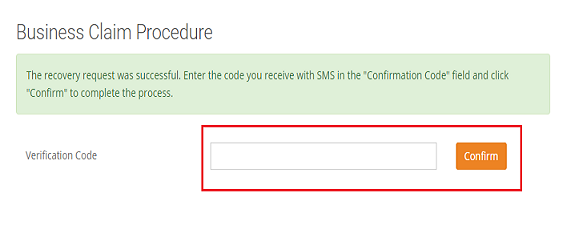
In the Code Confirmation field, fill in the received code
Press Confirm.
Now you can manage your business presentation. Don’t forget to save your changes each time before exiting. The changes might take some time until they appear all in your presentation due to content renewal procedure programmed daily. From now on you are able to login and manage your own business directly. Taka advantage and describe your business the best way, with recent photos and much details, to benefit mostly.